
A shoot day isn’t one thing. It’s six things, in a specific order, with different gear and different people.
An event tells you there’s a shoot on Tuesday. It doesn’t tell you that the CEO interview is at 10, that the drone team is outside at noon, that two crews are shooting B-roll in different buildings at the same time, and that the 24-70 is needed in both places at once.
That’s what setups are for. A setup is a single piece of the day — “Interview with the CEO,” “B-roll in the warehouse,” “Drone exterior,” “Wrap and load out.” Your event is the shoot; setups are what actually happens inside it.
Think of them as sub-events. Same shoot, broken into the parts a human actually works from.
WHAT GOES IN A SETUP
Each setup carries the four things somebody needs in order to show up and work:
A time. Start and end. This is what turns a list into a day.
A location. “Conference room,” “Warehouse floor,” “Exterior — north lot.” On a multi-building shoot, this is the field that stops people wandering.
The crew. Assign people from your event to the specific setups they’re on. Not everyone is on everything — the drone op doesn’t need to be at the 7am call, and now they don’t have to guess.
The gear. Assign gear that’s already reserved or checked out to the event down to the setup that needs it. This is the one that changes how a day runs: it’s no longer “here’s the gear for Tuesday,” it’s “these six items are on the interview, those four are on the drone.”

IT READS AS A TIMELINE
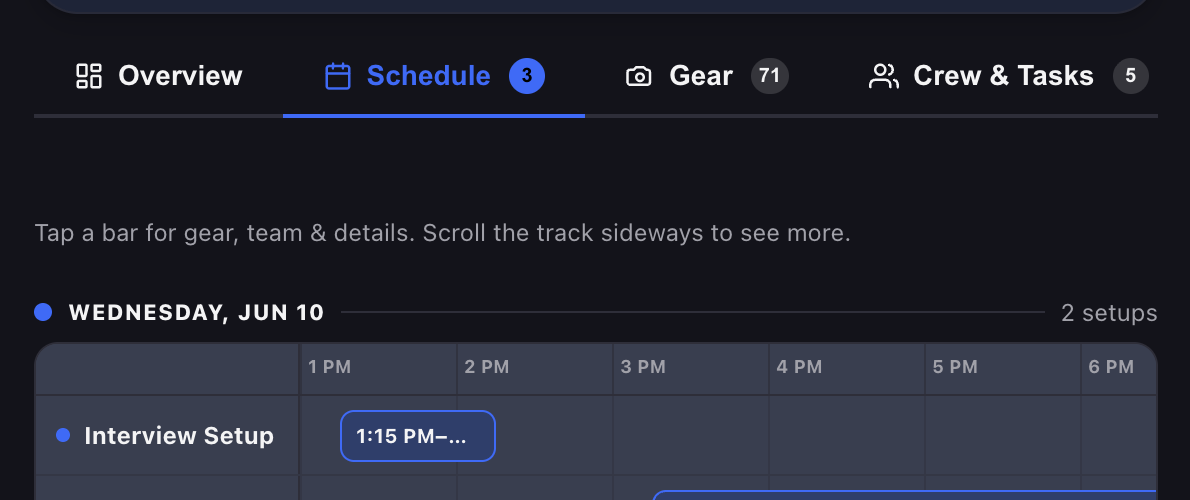
Setups don’t render as a list of rows. They lay out as a timeline, sorted by start time — so the shape of the day is visible at a glance rather than reconstructed in someone’s head.
Two crews shooting simultaneously in different buildings looks like two things happening at once, because it is two things happening at once. The gap between the interview wrapping and the drone launching looks like a gap. The 20 minutes you forgot to leave for a company move is suddenly, obviously, not there.
Multi-day shoots group by day, so a week-long job doesn’t collapse into one unreadable strip.
THE PART THAT MATTERS ON SET: THE PRINTED MANIFEST
Here’s where setups stop being a planning tool and start earning their keep.
When you print your manifest, every setup that has gear assigned gets its own column — and each gear row is marked for the setups it belongs to. Look down the page and you can see, per item, exactly where it’s going.
Each setup gets a letter and a colour — A, B, C, up to J. The letter is the detail that matters: colour alone breaks the moment somebody prints in black and white, or hands it to a crew member who’s colour-blind. With letters, a grayscale manifest taped to a case is still perfectly readable. Ten setups can carry gear columns on a single manifest.
So the AC standing at the truck doesn’t ask “does this go to the interview or the warehouse?” — they read the row. The manifest becomes a packing list and a routing sheet in the same page.
HOW TO ACTUALLY BUILD ONE
Start with the big rocks, not the minute. Interview, B-roll, drone, wrap. Rough times. You’re sketching the shape of the day, and you’ll be wrong about the minutes anyway.
One setup per thing that has a different answer. If the gear changes, the location changes, or the people change — that’s a new setup. If it’s the same crew doing the same thing in the same room for three hours, that’s one setup, not four.
Name them the way the crew talks. “CEO interview” beats “Segment 2.” The schedule is read by tired people at 6am.
Assign gear last. Reserve everything for the event first, then distribute it into setups. Working the other way round means fighting the availability calendar and the schedule at the same time.
Overlaps are information, not errors. Two setups at the same hour is exactly how a two-crew day looks. The timeline is doing its job by showing it — and it’s also how you catch that both crews need the same lens.
WHERE SETUPS EARN THEIR KEEP
The 24-70 problem. Two crews, one lens, same hour. In a gear list, that’s invisible. Split across setups, it’s obvious the day before instead of a phone call at 11am.
The person who only needs to be there for one thing. Assign them to their setup and they know their window. Nobody sits in a parking lot for four hours.
The company move nobody scheduled. Gaps become visible when the day is on a timeline.
Load-out routing. The manifest tells you what goes where, per item, in one page.
ONE NOTE ON PLANS
Schedule and setups are a Pro feature — they’re on every paid plan, not the Free tier. Free covers the fundamentals: your inventory, your events, checkout and returns. Setups are for when a shoot day has enough moving parts to need a run of show. See plans →
PLAN THE DAY, NOT JUST THE DATE.
COMMON QUESTIONS
The event is the shoot — the date, the crew, the gear reserved for it. Setups are the pieces of the day inside it: the interview, the B-roll, the drone. One event, many setups.
Yes, and they should when that’s the truth. Two crews in two buildings is two overlapping setups — the timeline shows them side by side, which is also how you spot that both of them need the same lens.
Yes. A camera used at the interview and again for B-roll appears on both, and the manifest shows both letters on that item’s row.
No. Gear reserved for the event works fine without ever touching a setup. Assigning it is what unlocks the per-setup manifest columns — worth it once a day has enough moving parts to get confusing.
p to ten setups with gear get their own lettered column. You can build more than ten in a day; the columns cap at ten.
Yes. Setups group by day, so a week-long job reads as a week, not one long strip.
Yes — Javi runs in any browser, and the apps make it quicker on set.