
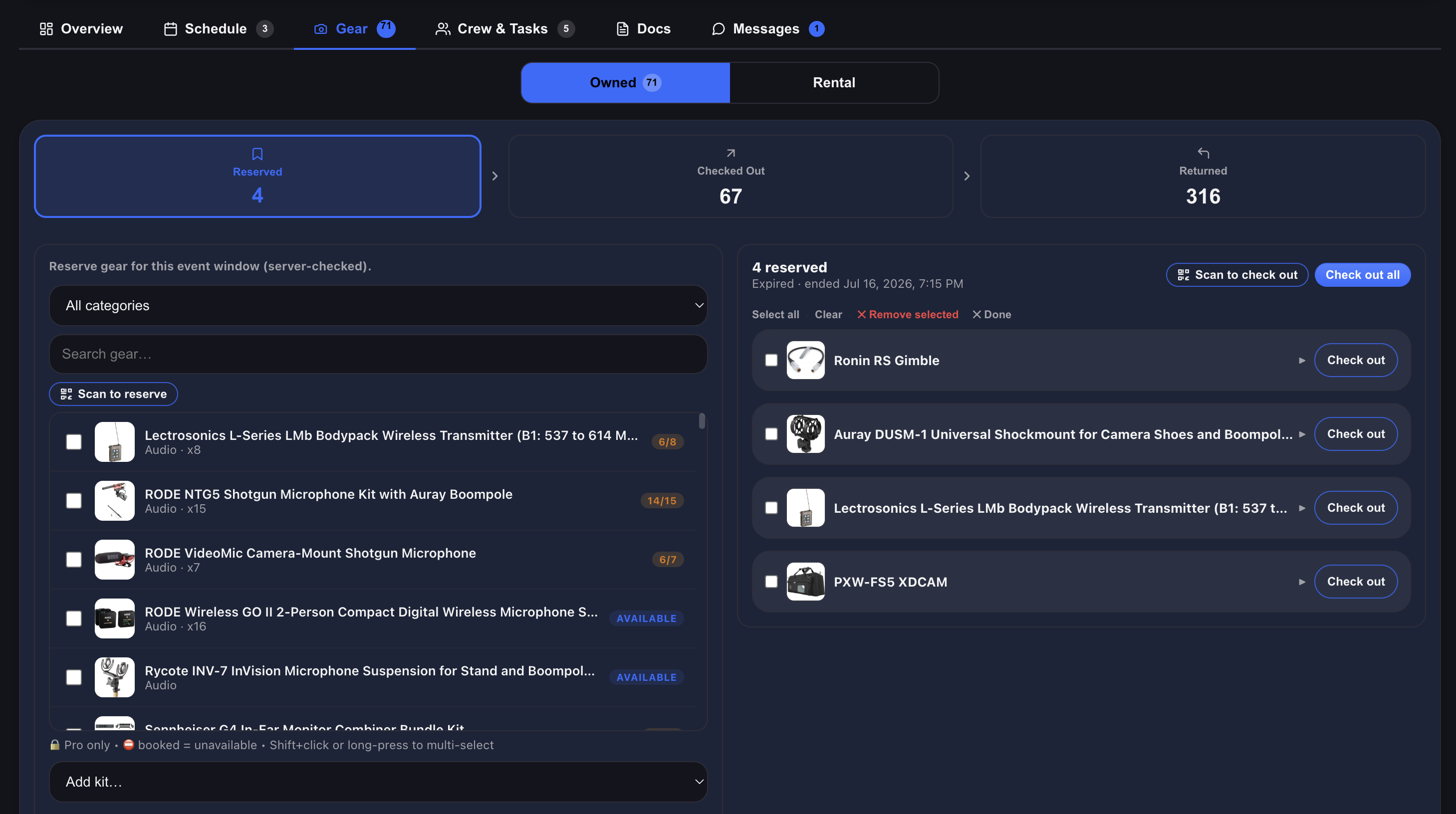
Reserve it, take it, bring it back — with a record of every hand it passed through.
Ask most production teams “who has the A-cam right now?” and you’ll get a pause, then a guess, then a text message.
That’s not a people problem. It’s what happens when gear moves faster than the system tracking it. A checkout process fixes it — not with more paperwork, but with three clear phases that take seconds each and leave a record behind.
Here’s how it works, and why each phase exists.
PHASE 1 — RESERVE IT
Reserving gear for a shoot is a claim: this camera is spoken for on these dates.
The important part is what it prevents. Once an item is reserved, it’s locked for those dates — nobody else can reserve it or check it out to a different shoot on the same day. The conflict gets caught the moment someone tries to make it, instead of at 6am when two crews reach for the same case.
Reserve a kit and every item in it comes along. Build the A-cam package once, and reserving the kit reserves the body, the lenses, the batteries, the cards — the whole thing, in a single move. It’s the difference between claiming a package in one click and remembering fourteen items by hand.
This phase is where the planning happens. Everything is still on the shelf; you’ve just called dibs.

PHASE 2 — CHECK IT OUT
Check-out means the gear has physically left. It’s not a plan anymore — it’s on a truck.
That distinction matters more than it sounds. Reserved gear is still in the building and can be re-planned. Checked-out gear is on location, in someone’s hands, and if it doesn’t come back, you need to know exactly whose. Splitting the two phases is what makes the answer to “where is it right now?” honest.
Watch the value walk out the door. If your items have values on them, Javi shows you what a shoot is carrying and what’s currently out on location — the total worth of the gear in the field, right now. Useful for insurance conversations, useful for deciding whether that truck gets left unattended.
PHASE 3 — RETURN IT
Returning gear checks it back into inventory and puts it back in the available pool, ready for the next shoot.
And it leaves a receipt. Every phase is recorded per item: who reserved it, who checked it out, who brought it back, and when. Not to catch anyone out — but when a lens comes back with a scratch that wasn’t there Tuesday, you don’t have to reconstruct the week from memory. The trail is already there.
FLAG THE THING THAT WENT WRONG
Gear takes a beating, and the moment you notice is almost never the moment you’re at a desk.
Any item on a shoot can be flagged with a note and a photo, straight from your phone. A scuff on a matte box, a lens that’s started hunting, a light that flickers at 40%, a case that came back one clamp short — flag it, photograph it, and it’s attached to that item with your name and the date on it.
That photo is the part that matters. “It came back damaged” is an argument. A timestamped photo, attached to that item, raised by a named person on a specific shoot, is a record — for the crew, for the client conversation, and for the insurance claim.
Flags are also how the next person knows. The nastiest gear problem isn’t the broken item — it’s the quietly broken item that gets packed for a job because nobody wrote it down.

RENTALS RUN THE SAME PLAY, DIFFERENT WORDS
Gear you rent in moves through the same three phases — they just go by different names, because a rental has a different ending:
Ordered — you’ve booked it with the vendor. Same idea as a reservation: it’s committed, it’s on the shoot, it isn’t here yet.
Received — it’s arrived and it’s in your hands. Same as checked out: it’s live, it’s on location, it’s your responsibility.
Shipped — it’s gone back to the rental house. And here’s the difference: once rental gear is marked shipped, Javi automatically removes it from your inventory — with a receipt of the whole run. It doesn’t linger in your gear list as a ghost item you have to remember to delete, because it was never yours. The record of it stays; the item doesn’t.
That’s the right behaviour for rentals. Owned gear returns to the shelf. Rented gear leaves — and the paperwork stays behind.

THREE WAYS TO DO EVERY PHASE
Every one of these steps — reserve, check out, return, order, receive, ship — can be done three ways, and the right one depends on where you’re standing:
One at a time. At a desk, planning. Fine for a few items.
In bulk. Select a stack, move them all at once. This is how you check out a whole shoot in one action instead of forty.
By scanning. With the built-in QR/barcode scanner, on the shelf, phone in hand. Scan a case, it’s out. Scan it on the way back in, it’s returned. No typing, no laptop, no clipboard.
The scanner is what makes it stick. A system only stays accurate if updating it is faster than not updating it — and a two-second scan clears that bar even at 6am. Here’s how to get your gear labelled.
WHY THE PHASES ARE WORTH IT
“Reserved” and “gone” are different problems. Merging them is what makes a gear list lie. One is a plan you can change; the other is a truck you can’t.
The receipt ends the guessing. Not about blame — about not spending twenty minutes reconstructing who had what.
Damage gets caught while it’s still cheap. A flag with a photo on Tuesday is a repair. The same problem discovered on Saturday’s shoot is a reshoot.
Value visibility changes decisions. Knowing $40k is out on a location is the kind of number that changes how the truck gets parked.
Rentals close themselves out. Nothing to clean up, nothing to remember, no phantom items in your gear list.
COMMON QUESTIONS
Reserved means claimed for those dates but still on your shelf. Checked out means it’s physically gone. Reserving stops the double-booking; checking out tells you where it actually is.
No — that’s the point of reserving. Once it’s locked for those dates, the next person sees it’s taken before they commit.
Reserve when you’re planning ahead. If gear is walking out the door right now, the checkout is the phase that matters — the record is what counts.
Javi removes it from your inventory automatically and leaves a receipt of the full run — ordered, received, shipped. Your gear list stays clean.
Yes. Reserve or check out the kit and every item in it comes with it.
Anyone on the shoot. That’s the point — a flagged item should be visible to whoever picks it up next.
The app is the fastest way to scan on set, but Javi runs in any browser.